|
||||||||||||||||
|
If you enjoy these games, you will certainly enjoy the games at:
Highly recommended!
PRIVACY
We guarantee that we will never sell, rent, give or distribute your personal information (name, address, email, credit card, etc) to anyone else.
We, too, hate spammers and mad-dog marketeers!
|
 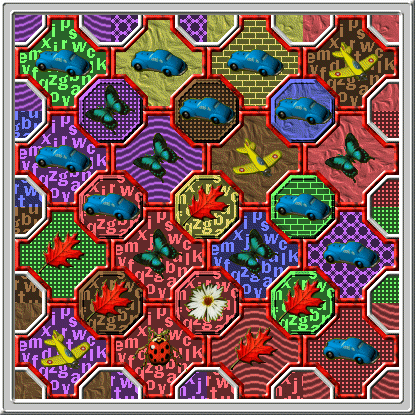
Occam's Quilt is a game of logic and deduction. The goal is to rearrange the 'plus-shaped' quilt pieces so that each of them
shares at least one attribute in common with each surrounding quilt piece (both the 'plus-shaped' pieces and the
'octagonal-shaped' posts). Some puzzle have row and/or column clues which force a single unique solution, but the game can
also be played with those clues hidden, which will frequently allow more than one possible solution, but even discovering
one solution may prove challenging. The picture above is of a small puzzle. There are over 120 puzzle sizes (maps)
from extremely trivial to extremely difficult, with over 65,000 puzzles in each map. Each quilt piece has three attributes:
color, background pattern, and picture. There are 6 colors, 6 patterns, and 6 pictures
(although not all may be used in any given puzzle).
The demo is fully functional, but has a limited number of puzzles. Notes On Creating Image SetsFor those of you interested in creating your own image sets, here are a few points of interest: 1) It's VERY important, for a good (ie, playable) image set to: a) have six texture patterns that are clear and easily distinguished from each other at all six image sizes. b) have six symbol pictures that are easily distinguished from each other and that stand out well against all six texture patterns. c) all six texture patterns should be rendered at a very similar level of darkness/lightness. This one is hard to quantify, but if you squint (so your sight is blurry) and look at your image set, do some of the textures look significantly darker or lighter than the others? If so, you should try to adjust their brightness to better match the brightness of the other textures. Otherwise, when the different textures get colorized to the same color, they won't LOOK like the same color. Besides these notes, also see the Help-HowToPlay-GRAPHICS (Game Graphics) within the game for further details. 2) It is important that the "move this square" and "to here" indicator animation graphics NOT be completely congruent. ie, if either is placed in front of the other, will the either COMPLETELY obscure the other? If so, that's bad news for the player, because frequently a square can be placed where it already is, so both the "move this square" (source) and "to here" (destination/target) graphics will be drawn on top of each other at the location that the player has right- or middle-clicked upon, and if they're totally congruent, one of them will completely hide the other one. 3) The game graphics 'pieces' are actually square-shaped, with "transparent" areas causing the pieces to look non-square (see the Occam's Quilt help pages about creating graphics for more on the transparency colors, etc). The top-left-most diagram below shows how the default image set graphics are arranged when drawn on the game screen. The larger plus-shaped pieces are outlined with black squares, and the smaller octagonal-shaped 'post' piece is outlined in white. For each of these 'squares' the ENTIRE square is drawn, except for those areas with a transparent color. This means that you can make the shapes of the pieces be ANY shape you want (within reason). They don't even need to be symmetrical. An example of this is shown in the top-right diagram. When trying to create a set of pieces with alternate shapes, the best way to do it is as shown below. Then, once you've got them designed the way you want them to look, then you can cut the individual shapes out and paste them into your new image set. You'll probably start with one size of image (the largest, for example), and once you've got them done, then resize them, use those resized images to create another 'working bitmap' like below, clean them up (get the edges sharpened), then cut and paste them back into the image set. This will establish the basic SHAPES for your image set (if you want the same shapes as some other image set, then simply copy that image set and skip this step). Then you still have to create the six different texture patterns and six different picture images (at all six sizes). Nobody said this was going to be easy! :-) The bottom two diagrams below show other possible alternate shapes. Remember, the 'pictures' have to fit within both shapes, so don't make the 'post' shape TOO small! 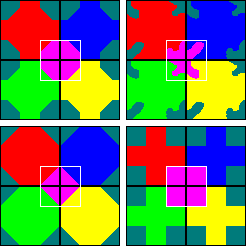
|
If you don't have to have a Paypal account, when you get to the Paypal site, just click on the "If you don't have a PayPal account?" link and they'll submit the charge to the credit card of your choice. To order by mail or phone, see Contact us.  Occam's Quilt DOWNLOAD $19.95
Occam's Quilt FREE DEMO DOWNLOAD
The demo and licensed versions are identical, except that the demo version has limited numbers of puzzles, and the licensed version may have additional support files (like extra image sets). So, if the demo version works for you, the licensed version will, too. If the demo version doesn't work for you, neither will the licensed version. Generally, you don't need to un-install a demo version before installing the licensed version. The licensed version will install right over the top of the demo version and use all of the settings you've already created with the demo version. NOTE: You can NOT upgrade your licensed version by installing a newer demo version over the top of the licensed version. You would just end up with a demo version. |