|
||||||||||||||||
|
If you enjoy these games, you will certainly enjoy the games at:
Highly recommended!
PRIVACY
We guarantee that we will never sell, rent, give or distribute your personal information (name, address, email, credit card, etc) to anyone else.
We, too, hate spammers and mad-dog marketeers!
|
 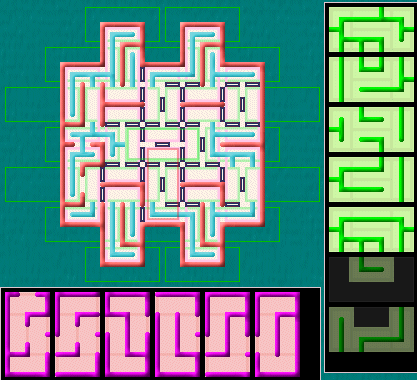 Above is one of the simplest layouts from Knarly Jigs, showing the puzzle, the Wall Jigs across the bottom, and the Path Jigs down the right. (Not all of the Wall and Path Jigs are shown here.) The game keeps track of which Jigs are possible at each location in the puzzle. As you solve the puzzle, for each location, you mark Wall and Path Jigs as “not possible”, reducing the number that will fit at each location. You do this through logic, no guessing. The Jigs overlap each other in the same fashion as the bricks in a brick wall. Using the above puzzle as an example: 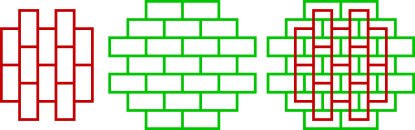 This shows the outlines of Wall Jigs (left) and Path Jigs (middle), and how they fit together to “tile” the puzzle. The figure on the right shows how the Wall Jigs and Path Jigs overlay each other. Often there will be “partial Jigs” where only a part of the Jig is actually used in the puzzle itself. You can see two partial Path Jigs at the bottom of the clues in the top-most figure above. When Wall Jigs are placed next to each other in the puzzle, the side wall segments in the Wall Jigs must match. Similarly, when the Path Jigs are placed into the puzzle, the paths leaving and entering adjacent Path Jigs must match. The paths in the Path Jigs will fall perfectly between the walls in the Wall Jigs, and the paths will never cross the walls. When completed, the puzzle will be a maze defined by the walls, and the paths will form one continuous trail that travels to every nook and cranny of the maze (as shown in the solution to this puzzle below). Further, there will be no loops in the path, and all of the paths will be connected. 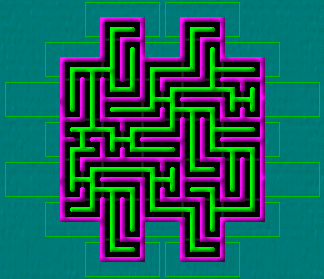
The licensed game comes with over 150 different layouts, and each layout has over 65,000 different puzzles! The layouts vary in
complexity from the simplest containing 20 or 30 Jigs up to the most complex containing over 250 Jigs. The program text and help text are
stored in external ASCII text files that are easily translatable. The menus and dialogs are currently available in English, Danish, and
German, and the Help is in English and Danish (user selectable). I don’t speak German or French or Latin (although I could do a Pig Latin
translation...), but if any of you would like to try your hand at translating the text into your native tongue, I’ll be happy to post
your translations on the this web page for others to enjoy.
The demo is fully functional, but has a limited number of puzzles.
|
If you don't have to have a Paypal account, when you get to the Paypal site, just click on the "If you don't have a PayPal account?" link and they'll submit the charge to the credit card of your choice. To order by mail or phone, see Contact us.  Knarly Jigss DOWNLOAD $19.95
Knarly Jigs FREE DEMO DOWNLOAD
The demo and licensed versions are identical, except that the demo version has limited numbers of puzzles, and the licensed version may have additional support files (like extra image sets). So, if the demo version works for you, the licensed version will, too. If the demo version doesn't work for you, neither will the licensed version. Generally, you don't need to un-install a demo version before installing the licensed version. The licensed version will install right over the top of the demo version and use all of the settings you've already created with the demo version. NOTE: You can not upgrade your licensed version by installing a newer demo version over the top of the licensed version. You would just end up with a demo version. |